
Loti-Bot

Building on the success of earlier robots like Bee-Bot, Blue-Bot and Rugged Robot, the introduction of Loti-Bot to the TTS computing range marked a significant step forward in helping children engage with coding through physical classroom resources.
What makes Loti-Bot great?
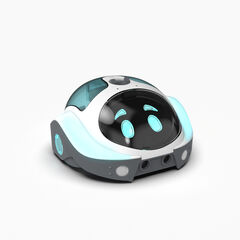
Loti-Bot’s integration of block-based coding via a dedicated app allows students to create more complex programmes, teaching them about algorithms and the real-world applications of robotics.
One of Loti-Bot’s key innovations is its ability to turn using specific angles, rather than being limited to simple forward, backward, left, or right movements. This feature opens up a wide range of curriculum applications. Additionally, the built-in pen holder enables lessons that span subjects – from drawing geometric shapes in maths to creating Spirograph-like designs in computer-aided art projects.
Loti-Bot’s light-up panels and bumper sensors introduce children to advanced coding concepts like variables and loops. These features allow for exciting experimentation and deeper engagement with coding.
Oti-Bot

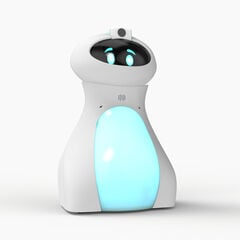
Just when you think the primary coding experience couldn’t be taken any further, along comes Oti-Bot – a larger, more advanced robot that builds on Loti-Bot’s solid foundation.
What makes Oti-Bot great?
Oti-Bot comes with a range of exciting features. It has its own block-based coding app, but it can also read QR codes. A set of pre-programmed QR codes are included, allowing children to give Oti-Bot instructions instantly. This makes Oti-Bot accessible from the start while still providing opportunities for students to develop their own complex programmes, which they can convert into QR codes for Oti-Bot to follow.
This ability to execute multiple sequences in quick succession makes Oti-Bot ideal for more sophisticated projects. The QR feature also has a Teaching Assistant (TA) function, which lets students scan their work alongside a QR code, saving it directly to their personal folder for easy transfer to school systems or portfolios.
Oti-Bot , therefore, becomes more than just a coding tool – it becomes a versatile classroom asset.
The app also features a control section where children can explore Oti-Bot’s capabilities without needing to enter the coding environment. In this mode, students can control Oti-Bot like a remote-controlled robot, adjusting its belly colour, facial expressions, and even tilting its head. A live video feed, viewable through the app, lets users see the world from Oti’s perspective. This opens up activities like treasure hunts or navigating mazes in the dark, with Oti’s glowing belly leading the way.
The video feed, powered by a built-in camera, also supports photo, video, and audio recording. These features can be accessed through the app’s remote control, or incorporated into custom coding programmes, allowing students to create detailed solutions to real-world problems. For example, Oti-Bot could simulate controlling a traffic intersection, with students managing it remotely, much like traffic controllers work from centralised locations. The range of functionalities enables students to create programmes of varying complexity, from simple commands to advanced algorithms.
Unlike Loti-Bot, Oti-Bot’s pen can be programmed to raise and lower, enhancing art lessons and shape drawing tasks. Oti-Bot also has a colour sensor on its underside, enabling it to change its belly colour based on the surface it moves over. This feature brings students’ programmes to life in a tangible way.
Oti-Bot also offers interchangeable belly attachments, such as a forklift or bucket, and includes facial recognition technology, all designed with children’s safety and education in mind. The robot has its own dedicated Wi-Fi connection, ensuring that data stays secure and is only accessible through the connected app. This also means that multiple Oti-Bots can be used in the same classroom without network interference, allowing for seamless collaboration among students.
To conclude

Both Loti-Bot and Oti-Bot offer extensive opportunities for students to experience coding in a hands-on, interactive way, bridging the gap between screen-based programming and real-world robotics. Either robot would be a valuable addition to any classroom, providing students with the tools to experiment and grow their coding skills.
With both robots, who knows where their newfound knowledge and creativity will take them?
Many thanks to Jodie Lopez for sharing her insights within this blog.
Jodie Lopez is an ex-primary school teacher who has won several awards for her use of technology across the curriculum. She moved from full-time teaching into working with education technology companies, to help bridge the gap between school and products/services on offer. As a Teaching Awards judge, she loves to see and hear about all the fantastic work teachers and schools are doing.
You can find Jodie at @jodieworld on Twitter, where she is always happy to answer any questions you have about technology for your school.